Author: Jared

  • Effective Online Learning: Staying Connected

    Online learning continues to be a growing environment in which higher education students are engaging in instruction and learning through web-based, virtual classrooms. However, there are some online courses that don’t quite hit the mark. Ineffective online courses, while convenient, usually lack the interaction and connectedness of a face-to-face course. This can make those students feel disconnected, which could then lead to students not completing or failing a course. It’s important to keep them socially and cognitively connected so that they end courses feeling successful.

    Stavredes (2011) stresses the instructor being actively present in the online learning environment as an important factor in student success. Not only instructor presence is important, but Stavredes says the variety and frequency of interactions in the course affects the students’ success. If an instructor is timely in responding to emails and messages from students, it will increase the student’s feeling of presence in the course. If the instructor holds weekly web conferencing (virtual “office hours”) and interact with students, they can feel more socially and cognitively connected. Sitting idly by watching the course, and students, go by is simply not an effective way of helping students succeed.

    Another way of increasing student cognitive presence is if the instructor encourages student to student interaction. This can be done through collaborative assignments like group projects, discussions, blogs, and wikis. There are also various Web 2.0 tools that can help with this. One of them is Trello, which allows for different virtual “boards” where students can discuss, build and trade ideas, compile resources (articles, YouTube videos, etc.), or informally interact. Students can also use Trello as a concept map which, as Hsu and Ching (2011, as cited in Hsu, et al., 2014) found, supports students’ “active and focused student interaction, communication, and their achievement of intended learning objectives” (p. 751).

    Above all, it is important for the instructor to be actively involved in the course, facilitating interaction between students while also interacting themselves. This interaction will help those students remain connected and help them succeed. While the presence will not be the same as a face-to-face course, it can assure them that they are not alone and part of a community of learners, wherever they are.


    References

    Hsu, Y.-C., Ching, Y.H., and Grabowski, B.L. (2014). Web 2.0 applications and practices for learning through collaboration. Handbook on Educational Communications and Technology. 747-758. Http://doi.org/10.1007/978-1-4614-3185-5_60

    Stavredes, T. (2011). Effective Online Teaching: Foundations and Strategies for Student Success. Jossey-Bass.

  • Adult Online Learning: Definition and Assumptions

    Online education is growing. In fact, a study done by Allen, Seaman, Poulin, and Straut (2016) found that as of 2014, 2.8 million people are taking only online education courses. This total is continuing to trend upward as well. As technology advances, high speed internet becomes more available to more places, and educational programs continue to improve, there is a definite chance that online education will grow even more over this new decade.

    What is online education?

    It is difficult to pinpoint a definition of online education because of its growth. It is also dynamic and ever-changing as technology improves. There are also different major factors that create different types of online education. Some schools offer distance education, which is solely online. Others will offer distance as well as blended, or hybrid, courses in which students still meet in a face-to-face environment but some materials, assignments, and discussions take place online. Other factors determining the online education include whether the course is synchronous or asynchronous, self-paced or directed by an instructor. Regardless of type or style, online education is marked by, as Ko and Rossen (2017) put it, collaboration, discussion, and usage of online resources. Another major factor in online education is the changing role of the instructor. The instructor is no longer seen as the driving force that delivers content but is instead seen as a facilitator and guide (Ko and Rossen, 2017).

    How does this apply to adult learners?

    Malcolm Knowles famously discussed six assumptions about adult learners for the purpose of helping instructors and administrators create effective and authentic content and instruction:

    1. Self-concept – the adult learner, as they mature, becomes more self-directed and less dependent upon others. In fact, they prefer working independently.
    2. Experience – adult education should be formulated in a way that the adult learner’s accumulated experience has a major role in instruction, assignments, and discussion.
    3. Readiness to learn– the adult learner’s willingness to engage the content is connected to their own social role and how they value the subject matter.
    4. Orientation to learn – in order for the adult learner to connect fully to the content of the course, they must see the relevance of the content to their daily lives. They need to see that they can use the received knowledge to solve an immediate problem that they may face.
    5. Motivation to learn– the adult learner is already internally motivated to achieve success in education. They are goal driven.
    6. The need to know – Much like assumption 4, adult learners need to see the relevancy of the material and its value. Once they see its value, they will fully buy in.

    When Knowles first discussed these assumptions, online education wasn’t a consideration. However, when the factors that make up online education are brought in alignment with Knowles’ assumptions, they blend well. Adult learners are self-driven, and ready to learn, so the self-directed nature of online education fits well. Collaboration and discussion are already crucial factors of online education. Giving adult learners the opportunity to discuss their experiences and to collaborate with others makes it relevant and timely for them. The most crucial factor that does not seem a given as others is the relevancy of the content. Instructors, designers, and administrators of online courses must make sure the content in adult online courses is relevant for their students. But for the majority of Knowles’ assumptions, online education is a great fit for adult learners.


    References

    Online Report Card: Tracking Online Education in the United States

    Ko, Susan, and Steve Rossen. Teaching Online: a Practical Guide. Taylor & Francis Group, 2017.

  • Final Course Reflection

    OK! Let’s do a deep dive into the course. I came in with a pretty good understanding on how to integrate technology into the classroom, but this course opened my eyes to some new strategies and concepts to strengthen my approach.

    Part One: Reflect on the entire course

    What have I learned?

    How to integrate across curriculum, not only in my own discipline. Mobile apps, using tools meant for Science and Math curriculum in ELA. Some great places to find primary sources!

    How have I grown professionally?

    Before this course, I had never had the time or resources to explore how to equip teachers outside Language Arts. Now I feel confident that when a teacher from a discipline like Chemistry asks for some integration ideas, I can equip them with a couple ideas.

    How have my thoughts about teaching been impacted by what I have learned or accomplished in this course?

    I have always been a proponent of empowering students. It wasn’t until recently when I discovered the potential of using educational technology in the classroom that I realized how well it plays with it. This course reinforced that. With the right technology, students can feel empowered. They can have a voice and have a choice in their education. And that’s from every step in the education process, not just using a Google Doc to create an assignment. They can use technology to engage with content, assess themselves, guide and direct their own learning, and create a product of their choice and preference.

    How did theory guide development of the projects and assignments I created?

    I tend to lean towards constructivism when it comes to pedagogical theory, and it plays nicely with technology integration. Aldoobie (2015) agrees with constructivism with the philosophy that students should take ownership of education thorough collaboration, among others. This student-centered focus is made more effective with the proper technology integration. In almost all of the projects and assignments I created, I tried to add an element of collaboration or students interacting with one another. If they were not collaborating, they were given the opportunity to direct and pace their own learning. This fits well into the student-centered pedagogy that is in constructivism.

    Part Two: Assess My Performance (based off of this rubric

    Content

    My score: Outstanding

    I think each of my posts are full of content, thought, insight, and synthesis. I made real-life connections to my own teaching experience and to the current status of education and/or technology integration. That’s why I believe I should score in the Outstanding column for this criterion. Maybe not the full 70 points, as I think that some deeper thinking could have been done in some of the posts. But overall, I think I did well enough to be put in this column.

    Readings and Resources

    My score: Outstanding/Proficient

    Looking back, all of my posts contain outside sources, but not all contain information from our textbook. If the scoring weighs more on usage of textbook and less on other sources, then I don’t believe I deserve the full 20 that’s in the Outstanding column. More likely in between Outstanding and Proficient.

    Timeliness

    My score: Outstanding

    All of my posts were done before the due date.

    Response to Other Students

    My score: Outstanding

    I did respond to posts as they became available and usually did two a week, but sometimes posts weren’t done in a timely manner, which kept me from posting before the due date. I do think that all of my posts were substantial in their content, however.

    Thanks for a great semester!


    Resources:

    Aldoobie, N. (2015). Technology Integration and Learning Theory. American International Journal of Contemporary Research, 5(6), 114–118. Retrieved from http://www.aijcrnet.com/journals/Vol5No6December2015/16.pdf

  • Assistive Technology on iOS Devices

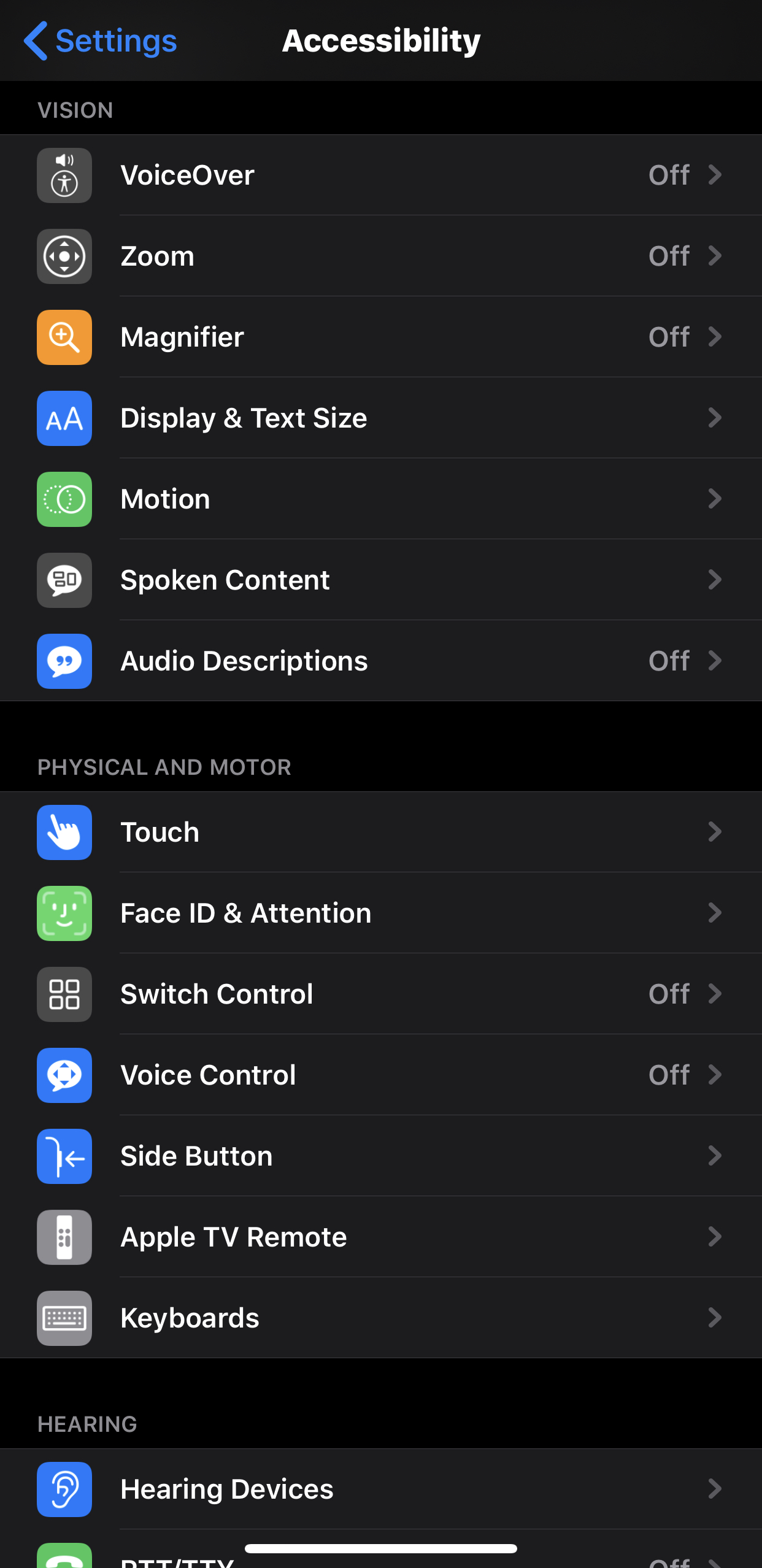
    There are many assistive technology features available on iOS devices. It seems to be a mission of Apple to make their devices as accessible as possible for those with physical difficulties. They have also provided plenty of documentation and support to make users aware.

    Vision Difficulties

    For those with vision disabilities, Apple offers various features, including VoiceOver (screen reader), Motion (reduces motion and movement), Magnifier (turns the device into a magnifying class) and so on. These features benefit those with vision difficulty because it allows them to access text as equally as other students. This will keep them from being isolated and will turn include them in the classroom. These features can also limit eye strain and headaches, which are common with students with vision impairment (“Inclusive Teaching: Blind and Vision Impaired”).

    Physical and Motor Difficulties

    Also on iOS devices are various features to make their devices more accessible to those with physical and motor impairments. iOS devices allow for switches to be added via Bluetooth or MFi (Made for iPhone). The physical device itself as well as the front-facing camera can also be used as switches. Users can also change the various swipes, gestures, and haptic features to make them more accessible. You can also change the various speed settings for double-click and triple-click feedback on devices, like the side button.

    There are plenty of other accessibility features available on iOS devices, which shows that as technology advances, it is becoming easier to incorporate many of the accommodations into everyday devices instead of having to rely on external instruments to provide the equality some students needs in the classroom.


    References

    “Inclusive Teaching: Blind and Vision Impaired.” ADCET, https://www.adcet.edu.au/inclusive-teaching/specific-disabilities/blind-vision-impaired/.

  • Obstacles and Solutions for Integrating Technology into Language Arts

    With technology’s advancements and the current generation of students’ adoption of new technologies, the desire to integrate technology into the classroom has increased. And with the growing popularity of online education, it has become more and more important to connect with students in the classroom through authentic learning and community. One of the ways of making that connection is to use technology to help students connect their world while developing educational skills.

    But what happens when the technology just doesn’t work? As in: it doesn’t foster discussion, hit higher levels of Bloom’s Taxonomy, or doesn’t become more than just being a commodity, easing access to content. More specifically, what happens when the technology is just…there? This is especially concerning in the Language Arts classroom. Most content through Language Arts isn’t necessarily easier to access with technology. Ebooks do have their advantages, but overall when it comes to engaging with a text, the physical book still rules. Instead, it’s more important to create learning scenarios in which students are using technology to develop skills like collaboration, communication, and inquiry (I talk about this more in “Changing the ‘How’”).

    In 2018, the National Council of Teachers of English (NCTE) released a statement in 2018 discussing integrating technology into the English LA classrooms. In it, they present four belief statements that discuss this issue of technology hindering growth and authentic learning. One of the belief statements challenges educators to “Consider literacies before technologies” (“Beliefs for Integrating Technology into the English Language Arts Classroom” 2018). NCTE challenges educators not to use a new technology just because it’s new or cool. Instead, consider the intentionality of the technology as a means to further the content and to help create credible instruction and authentic learning. NCTE (2018) admonishes educators to make technological decisions only when guided by established best practices.

    Technology is important and can create incredible, equal opportunities for students. But it can also be a danger, especially in the English LA, when it is used simply as a commodity. It’s important to keep the content in mind first, then use the technology as a supplement to create an avenue for authentic instruction and learning.

    Citations

    “Beliefs for Integrating Technology into the English Language Arts Classroom.” NCTE, https://www2.ncte.org/statement/beliefs-technology-preparation-english-teachers/.

  • The Relative Advantage of Technology in Language Arts

    Using technology in the classroom is easier in some disciplines than others. In the math and science areas, because of the practicality and the learned skills, technology tends to be easier to integrate. And this isn’t necessarily a fault of creators of useful apps or websites. No app creator or instructional designer has a grudge against certain disciplines. It’s just that those disciplines lend themselves to more objective answers and hard facts. Disciplines like Language Arts are harder to deduce to yes/no, right/wrong answers because of their subjective nature. Therefore, apps and technology for Language Arts are more specialized or emphasize newer instructional strategies. The relative advantage of using technology in Language Arts is that students can learn the content while also developing the necessary skills to help them succeed at the next level.

    Vocabulary has always been an integral part of the Language Arts curriculum. I’m confident that everyone reading this at one point in their K-12 career experienced the same method of teaching. It went something like this:

    1. Monday – Get the new words. They were either written on the board by the teacher and you had to copy them down. Or they were the next “unit” in a book. Once you wrote the words down, grab a dictionary from the bookshelf full of dictionaries and encyclopedias and copy the definition. Bonus points if your dictionary had half of the original sleeve still on it.
    2. Tuesday and Wednesday – forget all about your vocab words
    3. Thursday – Teacher would check for definitions and words. Then there was there review for the quiz the next day.
    4. Friday (pre quiz) – forget about the quiz and cram all those definitions into your short term memory while walking to class.
    5. Friday (post quiz) – immediately forget all of the words.

    And then repeat.

    Now, there are some great apps and websites that allow for students not only to learn the words, but remember them long after the quiz is done. Dr. Robert Marzano developed six steps to teach vocabulary: explain, restate, show, engage, discuss, and play (as cited in “6 Ways”). One of the websites that helps achieve all six of these steps is Membean. Membean give students a set number of words each week (as directed by the teacher). They see the word in various different ways: As cartoons, in videos, with definitions, in word clouds, with synonyms and antonyms, in interactive games, etc. They are also formatively assessed throughout. They are then assigned to complete a weekly quiz (or as decided by the teacher) to assess their learning. This newer tool takes advantage of new technology and allows for students to learn vocabulary and retain it.

    Another crucial 21st century skill that Language Arts can help develop is discussion. Much like the vocabulary story, I could take you back to the days of discussion in your high school classroom. A teacher stands in front, asks questions about he text, and everyone sits in silence waiting for the awkwardness to stop. Or waiting for that one talkative or smart peer to chime in. Sadly, that might still be reflective of current classrooms across the US. Modern technology gives Language Arts instructors an advantage in teaching students collaborative reading. Collaborative reading helps readers to “share ideas and consider alternative perspectives on the reading topic” (Roblyer and Hughes, 2019, p. 345). While this skill was still the goal of the old school and ineffective teacher-led discussion of days past, modern technology makes this much more effective. Using collaborative tools like Flipgrid allows for each student to have a voice. In fact, Flipgrid’s tag line is “Empower Every Voice.” It enables and empowers every student to contribute to a discussion and to share their opinions, beliefs, and perspectives without the fear of talking in a classroom. Their voices are heard, and communities are built. Apps like Flipgrid give Language Arts teachers a relative advantage in that students can, as Roblyer and Hughes (2019) say, “analyze the text, offer their own personal response, and engage in online dialogue with peers” (p. 345).

    So while it may be hard at first to find technology to integrate into the Language Arts classroom, with a little digging some resources can be found that empower educators to help create authentic discussion, foster collaboration, and build communities in their classrooms.

    “InClass.” Arizon K12 Center, https://www.azk12.org/homeroom/2016/06/15/6-ways-to-expand-students-vocabulary-with-technology/.

    Roblyer, M. D., and Joan E. Hughes. Integrating Educational Technology into Teaching: Transforming Learning across Disciplines. Pearson Education, Inc., 2019.

  • Acceptable Use and the Digital Footprint

    One of the most important issues that the students of this generation must be informed about is their digital footprint.The legacy they leave behind from what they post on social media, what is written about them, even the websites they visit will forever be impressed on the Web. One of the ways that higher education institutions are trying to help students leave a more positive digital footprint is through their Acceptable Use Policies.

    What is an Acceptable Use Policy?

    According to Webwise.ie, an AUP “is an important document which governs students’ use of the internet at school and covers a wide range of issues surrounding the rights, responsibilities, and privileges – as well as sanctions – connected with computer use. In other words, it is a set of guidelines set in place by an institution that protects students from doing harm to themselves (personally, professionally, educationally) or others. In essence, an AUP can help keep a student’s digital footprint sound and constructive.

    These AUPs aren’t limited to K-12 buildings either. Higher Ed Institutions have them as well. At the school in which I work, Cedarville University, the AUP (linked below) is fairly standard. There are regulations on copyrighted material, network security, sanctions for violating the AUP, among other regulations. Again, protecting the student’s digital footprint.

    To me, it is more important at the Higher Ed level to protect students, as many employers will vet job candidates by scouring their social media and doing some simple Googling. We have all read stories about candidates not getting jobs because of their digital footprint. Susan Kaleita, who works in Career Services at the University of Arizona commented on this idea: “Pretty much every recruiter is going to search people’s names on the Internet to see what they find before they invite someone for an interview” (as cited in Darrow, 2017, para. 2) So while an Acceptable Use Policy will protect students from plagiarism, cyberbullying, and other harmful materials, it also has its place in keeping a student’s online impression safe and making them more marketable when they enter the workplace.

    Links to the Acceptable Use Policies at Higher Ed Institutions


    References

    Darrow, M. (2017, May 18). A strong digital footprint may aid job prospects. Retrieved from https://www.kgun9.com/news/local-news/a-strong-digital-footprint-may-aid-job-prospects.

    What is an Acceptable Use Policy? A brief explanation. (2017, November 30). Retrieved October 26, 2019, from https://www.webwise.ie/teachers/what-is-an-acceptable-use-policy-2/.

  • The G Suite in the Classroom

    Word processing, presentation, and spreadsheet software are essential elements in the modern classroom. Each allows high school students to develop the skills necessary to succeed at the next level. They allow for constructivist learning; specifically, the software can help develop experience-based knowledge through trial and error, cooperation, and problem solving (Roblyer & Hughes, 2019, p. 55). 

    The Google Suite (G Suite) for Education is a revolutionary set of applications that have set the bar for purposeful integration of technology in the classroom. With sharing capabilities and add-ons, G Suite can be used daily to enhance instruction and create new opportunities for student learning. Let’s discuss two of the applications and why they should be an integral part of every secondary educator’s classroom.

    Google Docs 

    While it may seem like a Microsoft Word clone on the surface, Google Docs can become a metaphorical Swiss Army knife if you know how to use it. First, the included “Explore” feature allows students to do research via Google Scholar, search Google Images, or open existing documents in Drive for reference…all while staying inside of the document. This is a valuable tool for Language Arts educators who want to help their students grow and develop their research skills. But because research is also universal, any discipline can use it effectively. Google Docs, like other applications in G Suite, allows for collaboration. Students can work together on a written assignment, fill out a chart, or work independently on tasks that they as a group have delegated to each other. 

    Google Slides

    While it may not be as robust as Powerpoint, Google Slides makes up for it in its functionality. Slides is more than just a presentation tool. For example: educators can create interactive worksheets with embedded videos, quizzes, and animation. Educators can also use it as a class-wide collaboration task in which each student is assigned a slide and can work together on one presentation with one common objective. Students can also work in groups,  collaborating on presentations. I have used Slides in my classroom for five years, and I’m pretty sure I have used the presentation option the least. With some creativity and out-of-the-box thinking, Slides can be very versatile in the secondary classroom.

    Last, but certainly not least…

    Slides, Docs, and G Suite applications feature Add-Ons, which are third-party tools that enhance the abilities of the application they’re added to. For example: DocuTube allows for embedding of YouTube videos into a sidebar of a Google Doc. Pear Deck is an Add On for Google Slides that allows for interactive questions embedded seamlessly into the slidedeck. And if you’re a Google Sheets fan, rowCall can sort data and create sheets based on a certain column or row of a Google Sheet. 

    Oh and one more thing: Google Forms is the unsung hero of the G Suite for Education. Forms and Google Sheets together is a match made in Heaven.

    References:

    Roblyer, M. D., & Hughes, J. E. (2019). Integrating educational technology into teaching: transforming learning across disciplines. NY, NY: Pearson